
While setting up a build on Jenkins using the Git plugin (not sure what the Github plugin does, since it doesn’t handle checkout from github) I ran into the following error message:
Building in workspace /var/lib/jenkins/jobs/qasite-dashboard-selenium-tests/workspace
Checkout:workspace / /var/lib/jenkins/jobs/qasite-dashboard-selenium-tests/workspace - hudson.remoting.LocalChannel@f0f2eb
Using strategy: Default
Checkout:workspace / /var/lib/jenkins/jobs/qasite-dashboard-selenium-tests/workspace - hudson.remoting.LocalChannel@f0f2eb
Fetching changes from 1 remote Git repository
Fetching upstream changes from git@github.com:qa-site/qasite-dashboard.git
Commencing build of Revision 3b4da0edc2c97cb8837129471c45510a7610a63f (origin/development)
Checking out Revision 3b4da0edc2c97cb8837129471c45510a7610a63f (origin/development)
FATAL: Could not apply tag jenkins-qasite-dashboard-selenium-tests-16
hudson.plugins.git.GitException: Could not apply tag jenkins-qasite-dashboard-selenium-tests-16
    at hudson.plugins.git.GitAPI.tag(GitAPI.java:730)
    at hudson.plugins.git.GitSCM$4.invoke(GitSCM.java:1228)
    at hudson.plugins.git.GitSCM$4.invoke(GitSCM.java:1176)
    at hudson.FilePath.act(FilePath.java:788)
    at hudson.FilePath.act(FilePath.java:770)
    at hudson.plugins.git.GitSCM.checkout(GitSCM.java:1176)
    at hudson.model.AbstractProject.checkout(AbstractProject.java:1195)
    at hudson.model.AbstractBuild$AbstractRunner.checkout(AbstractBuild.java:579)
    at hudson.model.AbstractBuild$AbstractRunner.run(AbstractBuild.java:468)
    at hudson.model.Run.run(Run.java:1408)
    at hudson.model.FreeStyleBuild.run(FreeStyleBuild.java:46)
    at hudson.model.ResourceController.execute(ResourceController.java:88)
    at hudson.model.Executor.run(Executor.java:238)
Caused by: hudson.plugins.git.GitException: Error performing command: git tag -a -f -m Jenkins Build #16 jenkins-qasite-dashboard-selenium-tests-16
Command "git tag -a -f -m Jenkins Build #16 jenkins-qasite-dashboard-selenium-tests-16" returned status code 128:
*** Please tell me who you are.

Run

  git config --global user.email "you@example.com"
  git config --global user.name "Your Name"

to set your account's default identity.
Omit --global to set the identity only in this repository.

fatal: empty ident   not allowed

	at hudson.plugins.git.GitAPI.launchCommandIn(GitAPI.java:776)
	at hudson.plugins.git.GitAPI.launchCommand(GitAPI.java:741)
	at hudson.plugins.git.GitAPI.launchCommand(GitAPI.java:751)
	at hudson.plugins.git.GitAPI.tag(GitAPI.java:728)
	... 12 more
Caused by: hudson.plugins.git.GitException: Command "git tag -a -f -m Jenkins Build #16 jenkins-qasite-dashboard-16" returned status code 128:
Even after adding the git config info I was getting the same message. I found this post on StackOverflow enlightening:
http://stackoverflow.com/questions/6980570/why-hudson-jenkins-tries-to-make-commit
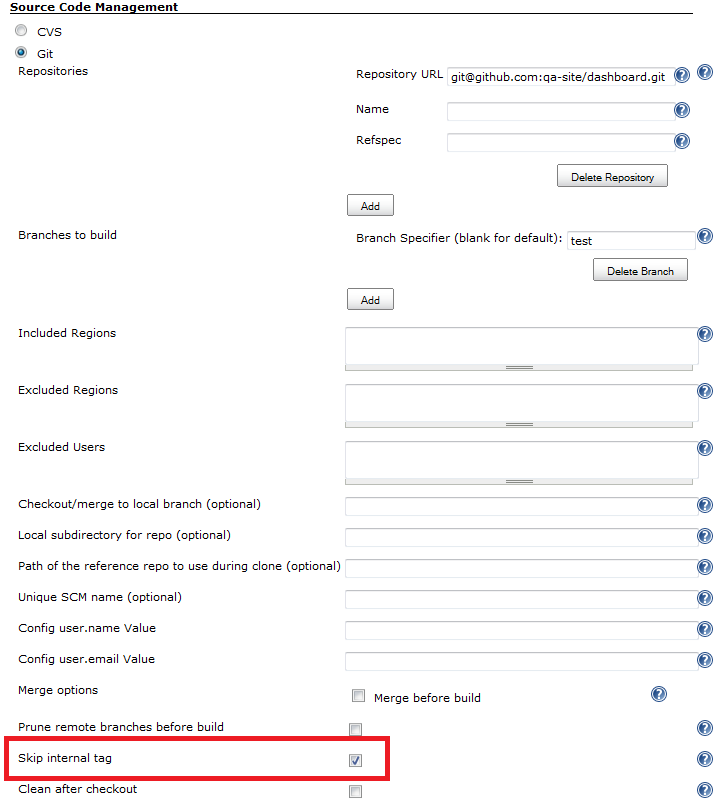
Turns out that somewhere buried under the job configuration for the git step (not clearly labeled as a step on Jenkins) if you click a button labeled “Advanced” and search for the text “Skip internal tag” there is a checkbox that you need to check if you don’t want Jenkins to create a tag on your remote repository after every build (yeah, it wants to do that every time, even if the build fails — and it will fail the build if it can’t.)

I’m liking Bamboo more and more, even though it’s buggy, has a weird shell (busybox, maybe?), has not nearly as many plugins as Jenkins, and is a resource hog.
 Fijiaaron
i got stumped by this today and your tips helped me out.. many thanks :D
Glad it helped.
Don’t you hate it when you google a question and your blog post complaining about the problem comes up as the first result.
And the first stackoverflow answer is someone referencing your blog post http://stackoverflow.com/questions/11122913/jenkins-git-tell-me-who-you-are-error-why-does-it-need-to-tag