Free Google Mail is going away. What are my options?

Google is ending it’s free email service with GSuite including GMail with custom domains.

What is your strategy going forward?

If you want to continue, it will cost you at least $12/user a month. If you have a small company with 10 people, that’s $1440 every year for email @yourdomain. Sure, you also get Google Docs and collaboration and file storage, but it’s enough for small business to reconsider. And if you don’t use their applications, it’s a hefty fee.

So what are your options?

Pay for Google Workspace
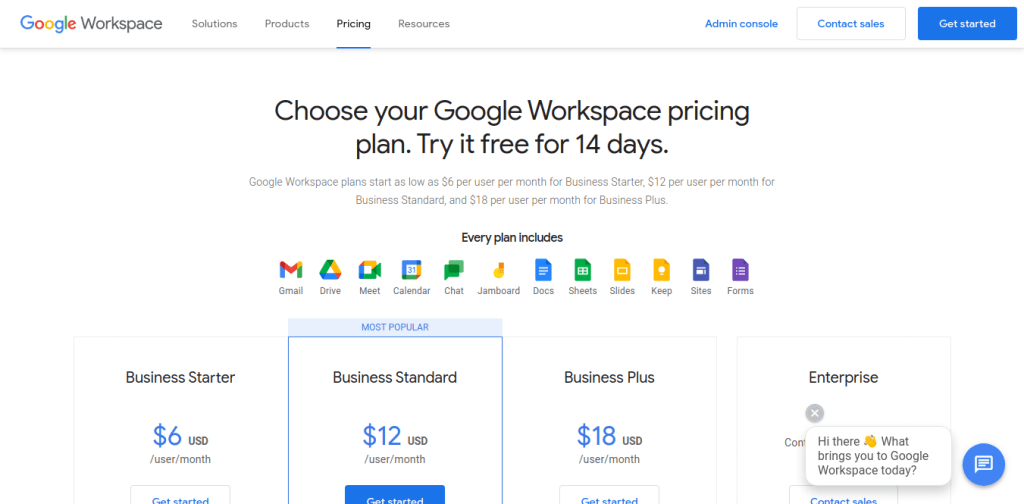
$6 / $12 / $18 — per user, per month.

This will include Google docs, sheets, etc and collaboration tools. The benefits of doing this is that normal workflow will not be disrupted. But it is expensive, and it would reward bad behavior.

I take this as a wake up call and an incentive to get off of Google — which is too powerful, and needs to remind itself continually to not be evil — or at least try to convince us that it is.

Switch to Microsoft 365

$5 / $12.50 / $20 — per user, per month.

This also includes Microsoft Office — including the desktop versions at the higher level.

If you are Microsoft shop already, this is definitely a reasonable choice. Outlook (offline) or the rebranded Hotmail webmail app are both a better UI experience than Gmail.

However, the cloud services, collaboration, and integration of Google Drive, docs, sheets, and forms makes a compelling case if you use those tools.

Use an alternative cloud service like Zoho
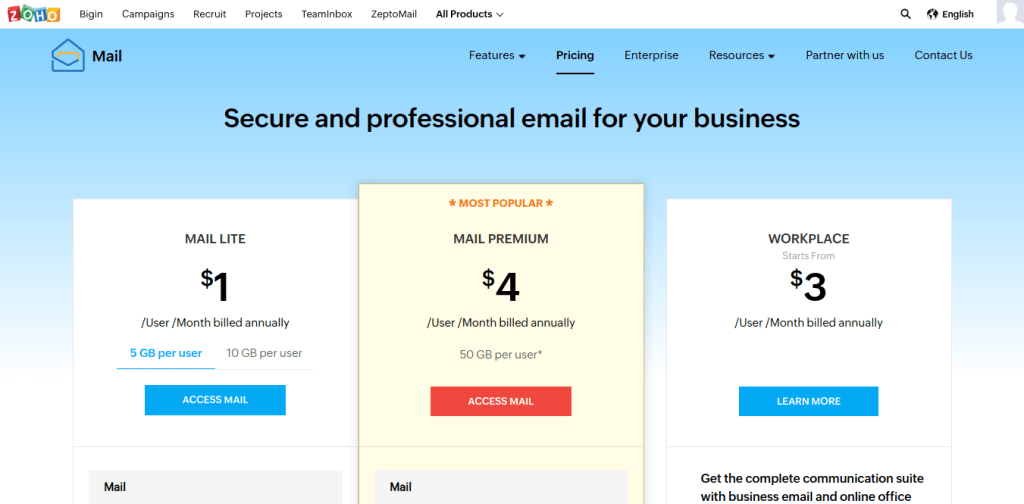
$1 / $4 / $6 or $7? — per user per month.

Zoho has cheap email but the workspace plan for $6/month also includes office applications. The quality is lower than Google or Microsoft though.

Zoho is a good option for a distributed workforce for teams that also use their business CRM and support tools, but at $37/month per employee can get pretty expensive. It’s a bit clunky however, and Zoho has had recent public data breaches.

Overall, I’d say that if you’re already using Zoho apps, its a workable email solution, but you’re better off with Google or Microsoft for just Email, Documents, or Collaboration.

Break free from the cloud

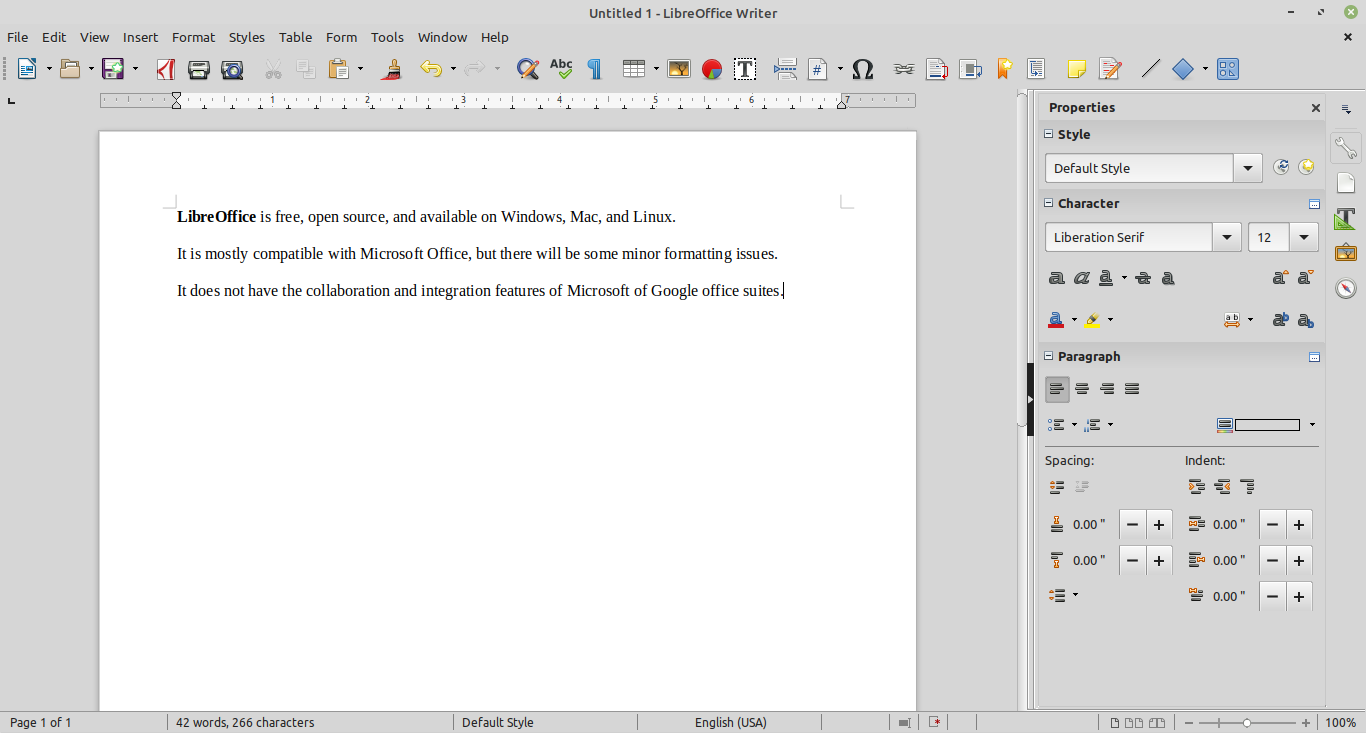
Another option is to skip an all in one cloud solution and use a free desktop office suite (LibreOffice) for documents. You can also pay for Microsoft Office.
There are many webmail clients, but you can also download email to an app (like Outlook or Thunderbird) on your desktop or mobile device. Like everyone used to do.

That still needs a solution for sending and receiving email. Gmail is still an option — if you only have and @gmail.com email address. But for professional or personal email with your own domain @yourcompany.com — you’ll need another solution.

Forward email from your domain provider to a free or cheap service.
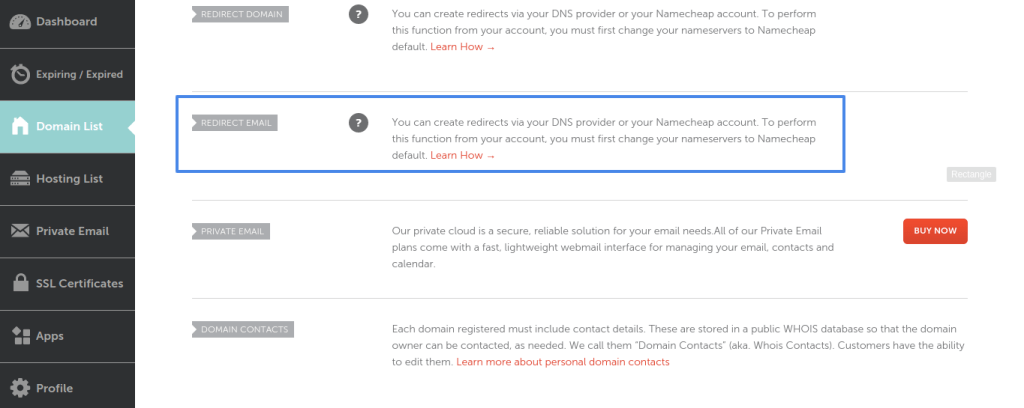
You can forward email to a free service like Gmail, or to any another email account. This is a viable, quick solution for individuals with a custom domain and one or more email aliases.

Use a low cost hosted email service.

You can set up email @yourdomain and have it forward to another service (like Gmail) or download to your own app.

There are a lot of webmail applications, but most of their interfaces are limited. And so are their storage options. So I would recommend setting up POP3 and downloading your email to use with a your own client. This can be tricky for non-technical users.

Use a traditional email server.

This last option is going to take some technical expertise or hiring someone to do it. Traditional email services have languished in the era of free Google email, but that era is coming to an end — quickly. I suspect many small businesses will need to take back ownership of their email and that traditional email services and profession email managed service providers will be making a comeback.

Currently, Google has the best spam filtering (by far). Microsoft is ok, but few webmail services can compare. There are commercial and open source spam filtering and antivirus tools, but they also require expert configuration and management. That is another area I expect to see more innovation.

I’m investigating all of these options, but in the long run, hope to take ownership of my email and help others to avoid being stranded in such a predicament again. The value of a good email administrator has definitely gone up.

Here is my own strategy:

  1. Pay for the first year of Google Workspace for my own small business accounts.
  2. Migrate (or remove) non-essential email (alternate domains, aliases) to the main account to reduce per-user fees.
  3. Forward / Redirect email from other domains to primary email accounts using Namecheap and GoDaddy free wildcard email forwarding.
  4. Evaluate Zoho mail for another small business where CRM and Support collaboration tools are needed.
  5. Backup all Google mail and documents to cloud (and local) storage.
  6. Investigate traditional email service provider for long term solution after year 1. Evaluating Fastmail or Protonmail for one small business.
  7. Use desktop and mobile email clients that use POP3 to download and IMAP for server storage — I think email protocols need a major overhaul.
  8. Use Microsoft Office (where licenses are already in use) and Libre Office (where full compatibility with Microsoft is not necessary).
  9. Make a goal of owning my own data (email and documents) with local and cloud backups.
  10. This includes evaluating other “free” cloud business services that may go away or become more expensive like Google email
  11. Support open source software and independent, decentralized protocols.

I’d like to hear your strategy for migrating off of Google Gmail & GSuite and would be happy to discuss them with you.


How Tests Calcify Applications at Different Levels

Tests tend to make your code more resistant to change and refactoring. There are things you can do to alleviate this, but at the cost of complexity in the test code (or experience in the developer.)

See: Tests are Great Calcifiers.

This is true of tests at all levels — unit, api, ui automation.

However, it’s actually inversely costly.

Unit tests, which are the easiest to write, and most focused, are most often tightly coupled to the implementation — and makes refactoring without ignoring or rewriting tests harder.

API tests are usually very tightly coupled to the API, making it resistant to change, but also can be easier to refactor or replace along with the API code.

UI tests can be tightly tied to the implementation, but patterns like page objects and user actions allow loose coupling between the tests and the implementation. However, it takes knowledgable and experienced developers to write loosely coupled UI tests.

So it turns out that the cost of tests — and their likelihood of being tightly coupled to the production code — at least as it relates to the risk of calcifying your application, are greater at the lower level, and lesser at higher levels.

Install MacOS updates remotely via Command Line over SSH

Automating OS updates can be an important part of OpSec. Here’s a quick script to enable automatic OS updates on MacOS:

See if Mac OS updates are installed by going to System Preferences > Software Updates > Advanced.

You want “Install MacOS updates” to be checked.

But you can also check this via the Command Line (when accessing remote devices via SSH, for example).

% sudo defaults read /Library/Preferences/com.apple.SoftwareUpdate

You should see a plist that includes:

AutomaticallyInstallMacOSUpdates = 0;

To enable “Install MacOS updates”

% sudo defaults write /Library/Preferences/com.apple.SoftwareUpdate AutomaticallyInstallMacOSUpdates -boolean TRUE

And it should now be enabled, indicated by

AutomaticallyInstallMacOSUpdates = 1;

{
    AutomaticCheckEnabled = 1;
    AutomaticDownload = 1;
    AutomaticallyInstallMacOSUpdates = 1;
    LastAttemptBuildVersion = "12.1 (21C52)";
    LastAttemptSystemVersion = "12.1 (21C52)";
    LastBackgroundSuccessfulDate = "2022-01-25 15:33:22 +0000";
    LastFullSuccessfulDate = "2022-01-25 20:41:17 +0000";
    LastRecommendedMajorOSBundleIdentifier = "";
    LastRecommendedUpdatesAvailable = 0;
    LastResultCode = 2;
    LastSessionSuccessful = 1;
    LastSuccessfulDate = "2022-01-25 20:41:21 +0000";
    LastUpdatesAvailable = 0;
    PrimaryLanguages =     (
        "en-US",
        en
    );
    RecommendedUpdates =     (
    );
}

And also represented with a checkbox in the SoftwareUpdate GUI.

You can now run “softwareupdate” from the command line to update MacOS:

% sudo softwareupdate --install --os-only --restart

Now you can automate your script to remotely check (and enable) automatic software updates on MacOS.

Optimizing test setup and cleanup for performance

There is an interesting post from Andrejs Doronins on LinkedIn about improving test performance:

https://www.linkedin.com/posts/andrejs-doronins-195125149_testautomation-activity-6889222015509639169-duEW

I replied and added my own comments below:

Remember though, that execution time is trivial compared to development, maintenance, and debugging.

So if you’re adding what seems like extra effort that slows down execution to have a clean environment and setup each time — the savings on reliable tests that pass consistently and find errors that tests that don’t “start from scratch” won’t find is so much greater.

That said — you can be smart in your initialization.

Things like initializing your database with common data only once before a test run, instead of on every test case. Or modifying environment configuration only for a specific suite that needs it can save valuable time compared to doing it for each test.

But this optimizations are sometimes not apparent when you write the tests — or may only apply to 1 test at first, and only become generalized as your test coverage grows.

The trouble here is, that rarely do you have time to go back and review working tests or a test framework to consider how you could optimize.

In this regard, once again, test code imitates production code.

Tonga volcano eruption felt in Fiji

I was shocked and saddened to hear of the destructive volcanic eruption in Tonga. And while international news has concentrated on possible tsunami effects thousands of miles away in Japan or California, my thoughts and prayers go out to the people of the South Pacific islands, especially Fiji where I lived and have friends.

It looks like the impact on Viti Levu (at least) was not severe but there is little information about what has happened in Tonga where communication has been cut off.

Lau group, being closer to Tonga has seen clouds of ash and debri. And the explosion was heard as far away and Nadi and the Yasawas.

I’d love more information from people in Fiji, Tonga , or other islands in the area.

Here is some interesting information from Fiji talking about the force of the shockwave measure in the air pressure and water levels in Suva:

https://m.facebook.com/story.php?story_fbid=10158473907645404&id=253197810403&m_entstream_source=timeline

The Fiji Sun and Fiji Times have articles about the local effects:

https://www.fijitimes.com/hunga-tonga-volcano-fijians-in-tonga-flee-for-safety-as-waves-crash-ashore-ask-for-prayers/

https://fijisun.com.fj/2022/01/15/fijians-in-tonga-seek-prayers-as-hunga-tonga-hunga-haapai-volcano-erupts/

Power and communications to Tonga have been cut off.

https://www.fijitimes.com/tonga-volcano-eruption-and-tsunami-no-power-communications-still-down/

Ash clouds and heat in Labeka, Lau

https://www.fijivillage.com/news/Families-in-Tubou-Lakeba-in-Lau-worried-as-they-say-they-can-see-airborne-ash-everywhere–5xr8f4/

Tidal surge from Tsunami:

https://fijisun.com.fj/2022/01/17/tidal-surge-enter-houses-in-lau-villagers-evacuate/

Flights canceled in Fiji due to volcanic ash clouds:

https://www.fijivillage.com/news/Several-Fiji-Airways-and-Fiji-Link-flights-cancelled-for-today-x5fr48/

Security. Quality. Simplicity.

Logging should be simple. Probably simpler than it is. The recent spate of Log4j vulnerabilities demonstrates that.

What else in your tech stack is over-engineered or exposed?

Your quality and security strategy should be:

How can we simplify?
Can we simplify without losing features?
Will simplifying actually improve features and usability?

#security #quality #simplify

Frozen New Year 2022

Looks like we’ll be welcoming the new year 2022 without water.

Subzero temperatures and a well mean our water pipes have frozen tonight on December 31, 2021. It may be a few days before we can thaw them enough to get water running again.

An Asynchronous Test Runner?

Here’s a conversation on LinkedIn talking about which programming language you should choose for a test framework — including comments about how automated tests are inherently synchronous (which I agree with) and why someone would write an asynchronous test framework in, for example JavaScript.

https://www.linkedin.com/posts/vikas-mathur_qa-testing-testautomation-activity-6871687300267474944-1MUL

Vikas Mathur

Typically, programming language for test automation can be any language, irrespective of which language the developers are using. However, to allow for more and effective collaboration with the developers, using the same language as them might make sense. Of course, there might be situations where it does make sense to use a different language – but in most cases, it makes more sense to use the same language. In case the language is different than the developers, it might make sense to use a language that has a good ecosystem for test automation. Something to think about while selecting a programming language for test automation.

(I agree with this)

Gabriele Cafiero 

I can’t still figure out why someone chose Javascript to test things. It’s asynchronous, and tests should be synced by definition. It has a weak typing so you have to double check any assertion of yours

(I agree with this also)


But here is where it sparked my own thought:

90% of the time, Javascript doesn’t need to be async, but library writers have a fetish for it because it was difficult for them to learn and so they want to show off that hard won knowledge.

But…there is a reason for asynchronous code and that’s efficient resource usage through task switching (i.e. the call stack).

Tests also have a need for this — although it’s not really utilized in any framework:

1. Tests need to run concurrently so you can get faster results
2. Tests take different times to complete, so you shouldn’t have to wait for a test blocking
3. Tests interact with asynchronous events (e.g. network, UI)
4. Test runs shouldn’t have to be discreet sequential loops.

Wouldn’t it be nice to have tests run continuously?
A test runner that listens for events to trigger tests and you don’t have to wait for (or kill) the previous test run to start another.

Imagine a continuous test queue that doesn’t depend on a specific job to run,

Imagine failing tests that dynamically rerun for stability.

Imagine commits that trigger specific tests, but don’t worry about full regression or smoke testing because that’s happening in the background.

So while an individual test needs to run synchronously (but also needs to await asynchronous events sometimes), having a test runner that operates in an asynchronous, event driven style is a great opportunity that hasn’t (to my knowledge) really been explored.

I keep confusing Peter Dinklage and Peter Mayhew

Here is Peter Mayhew as Chewbacca in Star Wars:

Here is Peter Dinklage as Tyrian in Game of Thrones:

While there is some passing similarity (besides the name) — perhaps in the way they groom their hair, or maybe a bit in the way they walk.

But Peter Mayhew is 7’3″. Peter Dinklage is 4’5″.

Maybe I should get a tape measure.

Anyone with a worse mixup?

On Productivity: Ducks & Chickens

Sometimes you produce more. Sometimes you produce less.

We got 2 ducks who didn’t start laying eggs until this fall. Since then, they’ve been laying pretty consistently.

Here is their output for the past two days:

The shiny eggs are from today. Every once in a while we get a giant — double sized — egg. It comes with two yolks. But today, we got this tiny little egg.

Did I complain?

No, I did not. I thanked her for the effort.

We also have about 40 chickens. We average about 2 eggs a day from them. But they laid all summer. There are still a couple hens that lay eggs – usually in the goat barn. (They’re leghorns, by the way). We’ll continue to feed the rest through the winter, knowing they’ll start producing again in spring.

There might be a work analogy in there somewhere.